 |
................ |
The Mouse
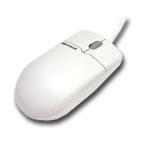
A mouse is an input device The mouse is used to move the the pointer around the screen There are two main types of mouse, a mechanical mouse that uses a ball and rollers to measure the movement of the mouse and an optical mouse that uses a light and a sensor instead. (Want to know about this in more depth then click here) Some mice have 1 button but most have at least two. It's now most likely to have a wheel button that can be turned forwards or backwards and clicked down. This is known as a scroll mouse because the action of turning the wheel normally has the effect of scrolling up or down a window. It can be put to other uses though. There are alternatives to mice such as track-balls. Mouse technique takes time to master however generally speaking when clicking a mouse button trey to do it gently rather than with a jerky movement, that way the mouse won't move position which can result in clicking the mouse in the wrong place.
There are three types of commonly used clicks of mouse buttons 1 Single left button click known as the "left click", "single click" or "click" 2 Two clicks of the left button in quick succession is known as a "Double click" To double click, quickly press the button twice in a row. keep your finger resting on the button, do not take your finger off while double clicking. I've seen people raise their finger up to click or double click. For single clicking that can work, but for double clicking it is easier to leave your finger on the button and press down twice 3 The right hand button is clicked once, this is known as "Right click" or "Right clicking" To drag, press the mouse button down, and keep it down. Then move the mouse. In some programs you drag and drop items. You first click on the object you want to drag, hold the mouse button down, and then drag the object to some location. Now you release the mouse button and the object is in a new location. Exercise 1 click on this line to open a mouse exercise window Exercise 1 alternative shorter version i i Connection types for mice
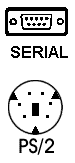
There are two types of mouse connectors, Serial and PS/2. Earlier computers tend to have the Serial connector while more recently made ones have a smaller 6 pin PS/2 socket. Check the picture above to find yours. Please note that there are many mice that use the USB type of connection not shown above. Always check you have a USB connection on your computer before purchasing a USB type mouse Simon Smith is a singer songwriter from England. Take a listen to his songs using the player on the left or download some of his songs directly from Reverbnation by clicking here or purchase others from CDBABY by clicking here If you like his music and you're on Facebook you can join his music page using the links to the right, follow him on Twitter using the links below, and if you want occasional updates you can add your email address to his contact list using the box under the music player to the left. If you want to check out his other activities use the links above |

................ |
The Globe above shows both where you and other visitors are located.
|
My Business Card 2008-2009
